Telemetry overlay software for the Mac: which one?
A DJI flight with its SRT file, a GoPro track session or an OBD log, and you want the gauges on the picture. What each tool does, checked on the vendors' sites on 9 September 2026. Tell us about any mistake and we will fix it. Version française.
Side by side
| YouMetry | Telemetry Overlay | RaceRender | DashWare | Garmin VIRB Edit | |
|---|---|---|---|---|---|
| Mac | Native Apple Silicon, App Store | Yes | Yes | No | Discontinued |
| PC (Windows) | Yes, Windows 10/11, Microsoft Store | Yes | Yes | Yes | Discontinued |
| DJI SRT | Yes, plus telemetry embedded in the MP4 | Yes | No (GPX/CSV) | No | No |
| GoPro GPMF | Yes | Yes | Yes | Yes | Garmin only |
| Insta360 | Yes, the file's own trailer: GPS and gyroscope | Yes | No | No | No |
| Measured lean angle | Yes, from the camera's gyroscope, calibrated against the track | Via third-party loggers | Via third-party loggers | No | No |
| GPX track | Yes, watches and phones included | Yes | Yes | Yes | Garmin only |
| RaceChrono, Dragy, VBOX | Yes: RaceChrono CSV, .vbo, laps and sectors | Yes | Yes | — | No |
| Garmin FIT (watch, Edge, VIRB, Catalyst) | Yes, laps included. Catalyst: files present up to software 5.2x, removed by Garmin in 5.30 | Yes | Yes | — | Yes |
| OBD-II | Live (Bluetooth) and MF4/MDF logs | Via third-party loggers | Via third-party loggers | Via third-party loggers | No |
| 3D route over real terrain | Yes: elevation, high-res aerial imagery, 3D vehicle | 2D map | 2D map | 2D map | 2D map |
| Live streaming with gauges | YouTube and VLC on the LAN | No | No | No | No |
| Transparent layer for editing | ProRes 4444 and PNG, hardware encoded | Yes | Limited | No | PNG sequence |
| Phone companion | Android on Google Play, iPhone in progress | No | No | No | No |
| Languages | EN, FR, DE, ES, NL | EN | EN | EN | Several |
| Account, cloud | None | Online licence | Licence | — | — |
| Price | One-time, CHF 90 (simple video editor launch price: CHF 39 / €39 / $39 until December 31) | Paid licence per OS, watermarked trial | Paid, several editions | Free, unmaintained | Free, unmaintained |
“Via third-party loggers”: the software reads the file from a data logger (AiM, RaceBox, RaceChrono…) but does not talk to the OBD port itself. Other vendors' prices change: check their sites.
What YouMetry does differently
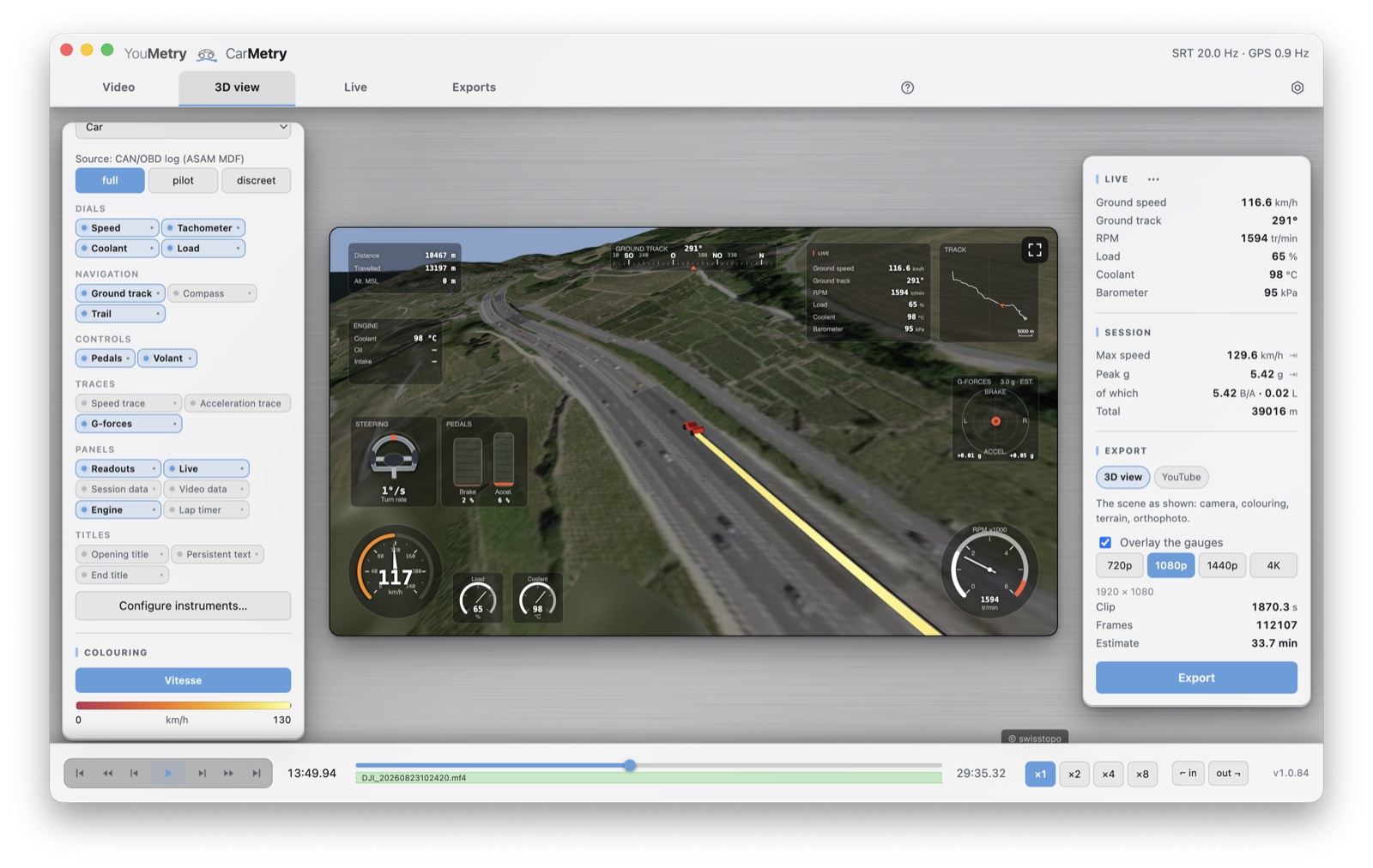
The picture shows a car session; drone, motorcycle and paraglider are handled the same way, each with its own 3D vehicle.
The route in 3D over the real terrain
Other tools drop a flat map in a corner of the frame. YouMetry replays the track over the real terrain, with high-resolution aerial imagery streamed along the route, a free or follow camera, and your vehicle exactly where it was. A mountain pass, a circuit, a valley: you watch the line as a spectator and judge it as a coach. The 3D view exports like any other shot.
Live
YouMetry streams the camera with gauges on top, live values from the OBD-II adapter, to YouTube or to VLC on any device on the network. None of the other tools in the table streams.
Capture at the wheel
The Android companion app records the phone camera, the lap timer and Bluetooth OBD-II; back home, the Mac reads it all for editing. The whole chain, from the track to the published video, from a single developer.
What YouMetry does not do (yet)
Telemetry Overlay reads more racing data loggers (AiM, VBOX, Alfano…). If your workflow is built around one of those loggers, it remains the right choice. YouMetry itself runs on Mac (Apple Silicon) and on PC (Windows 10/11), with the same projects on both sides.
Who it is for
- DJI drone pilots: drop the MP4 and the SRT, altitude, speed and distance gauges place themselves, and the flight replays in 3D over the terrain.
- Track-day riders and drivers: GoPro on the tank or the roll cage, a 20-franc OBD-II adapter in the port, and revs, temperatures, lean angle and lap times join the picture.
- Editors: a transparent ProRes 4444 layer to drop on the DaVinci Resolve or Final Cut timeline, framed exactly like the preview.
YouMetry on the Mac App Store YouMetry on the Microsoft Store Try it in your browser Press kit